
4D multiple layer type rendering#
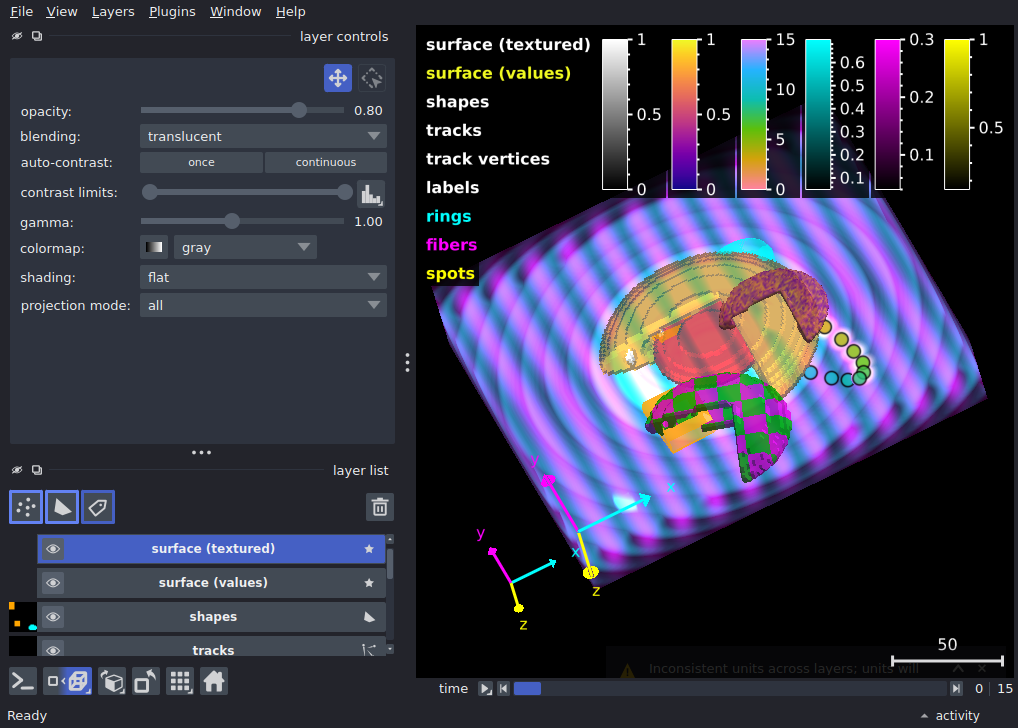
Display a synthetic 4D dataset (time, z, y, x) that exercises most
of napari’s layer types together in a single 3D-plus-time scene.
The spatial volume (z, y, x) is filled with three image channels
– “spots” (moving blobs), “fibers” (rotating stripes)
and “rings” (pulsing concentric rings) – built as multiscale pyramids
so they render efficiently in 3D. A 4-label segmentation derived from
those same channels shows off Labels rendering, 16 point
trajectories are shown both as a Points layer (colored by track id)
and as a Tracks layer with fading tails, a few static shapes add
simple flat annotations to the scene, and a Surface mesh – built
with skimage.measure.marching_cubes on label 2 (the orange shell)
– wrapping the shell region with a blocky, stepped surface.
That mesh is static, but its per-vertex coloring uses random values
with the 'plasma' colormap, giving the surface a swirly animated
appearance as you scrub through time (via vertex_values of shape
(n_time, n_vertices)). A gradient texture blends on top, exactly
like the plasma_spot demo in surface_texture_and_colors.py.
Along the way, this example also demonstrates non-uniform layer
scale/units (time in seconds, space in micrometers), locking a
multiscale image to its finest level, DirectLabelColormap, and
iso_categorical rendering for labels.
WARNING: Inconsistent units across layers; units will not be used for rendering.
WARNING: Inconsistent units across layers; units will not be used for rendering.
from __future__ import annotations

import numpy as np
from skimage.measure import marching_cubes

import napari
from napari.utils.colormaps import DirectLabelColormap

AXIS_LABELS = ('time', 'z', 'y', 'x')
IMAGE_SHAPE = (16, 24, 160, 200)
LAYER_SCALE = (1, 2.0, 1.0, 1.0)
LAYER_UNITS = ('second', 'micrometer', 'micrometer', 'micrometer')
OPENING_SLICE = (0,)
N_FIELD_SPOTS = 8
N_TRACK_SPOTS = 16


def make_coordinate_grids() -> tuple[np.ndarray, ...]:
    """Return broadcast coordinate arrays for four axes (time, z, y, x)."""
    n_time, n_z, n_y, n_x = IMAGE_SHAPE

    time = np.arange(n_time, dtype=np.float32)[:, None, None, None]
    z = np.linspace(-1.0, 1.0, n_z, dtype=np.float32)[None, :, None, None]
    y = np.linspace(-1.0, 1.0, n_y, dtype=np.float32)[None, None, :, None]
    x = np.linspace(-1.15, 1.15, n_x, dtype=np.float32)[None, None, None, :]
    return time, z, y, x


def normalize_layers(*layers: np.ndarray) -> tuple[np.ndarray, ...]:
    """Normalize all layers to [0, 1] using their shared maximum."""
    max_value = max(float(layer.max()) for layer in layers)
    normalized = [(layer / max_value).astype(np.float32) for layer in layers]
    return tuple(normalized)


def _downsample_spatial(arr: np.ndarray, factor: int) -> np.ndarray:
    """Downsample the last 3 spatial dims (z, y, x) by *factor* using local mean."""
    *leading, nz, ny, nx = arr.shape
    nz_out, ny_out, nx_out = nz // factor, ny // factor, nx // factor
    return arr.reshape(*leading, nz_out, factor, ny_out, factor, nx_out, factor).mean(
        axis=(-5, -3, -1)
    )


def _spot_center(
    time_fraction: float | np.ndarray, spot_id: int
) -> tuple[float | np.ndarray, float | np.ndarray, float | np.ndarray]:
    """Return the (z, y, x) center of a spot's looping trajectory.

    ``time_fraction`` may be a scalar or an array -- the same formula is
    used to paint the glowing 'spots' image channel (combined across
    many blobs, with an array ``time_fraction``) and to place the
    discrete point/track trajectories (with a scalar ``time_fraction``).
    """
    phase = spot_id * np.pi / 8
    z = 0.25 * np.sin(time_fraction * np.pi + phase * 0.5)
    y = -0.35 + 0.5 * time_fraction + 0.30 * np.cos(phase)
    x = 0.35 - 0.5 * time_fraction + 0.30 * np.sin(phase * 0.7)
    return z, y, x


def _spot_positions(time_idx: int, spot_id: int) -> tuple[int, int, int]:
    """Return (z, y, x) voxel indices for a spot.

    Each *spot_id* (0-15) follows a unique trajectory through the volume.
    """
    n_time, n_z, n_y, n_x = IMAGE_SHAPE
    tf = time_idx / max(n_time - 1, 1)
    z_pos, y_pos, x_pos = _spot_center(tf, spot_id)

    z_idx = int(np.clip(np.round((z_pos + 1) * 0.5 * (n_z - 1)), 0, n_z - 1))
    y_idx = int(np.clip(np.round((y_pos + 1) * 0.5 * (n_y - 1)), 0, n_y - 1))
    x_idx = int(np.clip(np.round((x_pos + 1.15) / 2.3 * (n_x - 1)), 0, n_x - 1))
    return z_idx, y_idx, x_idx


def make_image_layers() -> tuple[dict[str, list[np.ndarray]], np.ndarray]:
    """Build three 4D image channels as multiscale pyramids, plus labels."""
    time, z, y, x = make_coordinate_grids()
    n_time, _n_z, _n_y, _n_x = IMAGE_SHAPE

    time_fraction = time / max(n_time - 1, 1)
    time_phase = time_fraction * np.pi

    # ---- Accumulate multiple moving spots (pointwise max, not sum) -----
    spots = np.zeros(IMAGE_SHAPE, dtype=np.float32)
    for sid in range(N_FIELD_SPOTS):
        sz, sy, sx = _spot_center(time_fraction, sid)
        blob = np.exp(-(((z - sz) / 0.12) ** 2 + ((y - sy) / 0.055) ** 2 + ((x - sx) / 0.055) ** 2))
        spots = np.maximum(spots, blob)

    # ---- Core (central sphere that pulses) -----------------------------
    core_radius = np.sqrt((0.85 * z) ** 2 + y**2 + x**2)
    core = np.exp(-(core_radius**2) / 0.18) * (0.85 + 0.15 * np.cos(time_phase))

    # ---- Shell (concentric shell around core) --------------------------
    shell = np.exp(-((core_radius - 0.48) ** 2) / 0.02)
    shell = shell * (0.85 + 0.15 * np.sin(time_phase + np.pi / 4))

    # ---- Fibers (stripe pattern rotating with time) --------------------
    theta = time_phase / 3
    fibers = 0.5 + 0.5 * np.cos(10 * np.pi * (np.cos(theta) * x + np.sin(theta) * y) + time_phase)
    fibers = fibers * np.exp(-(z**2) / 0.42)

    # ---- Rings (concentric ring pattern with radial fade) --------------
    r_rings = np.sqrt(x**2 + y**2 + (0.75 * z) ** 2)
    rings = 0.5 + 0.5 * np.cos(16 * np.pi * r_rings - 1.5 * time_phase)
    rings = rings * (1 - np.exp(-4 * r_rings))  # fade to 0 at center
    rings = rings * np.exp(-(z**2) / 0.65)

    # ---- Fiducial (static marker) --------------------------------------
    fiducial = ((np.abs(y + 0.75) < 0.05) & (np.abs(x + 0.82) < 0.05)).astype(np.float32)
    fiducial = fiducial * np.exp(-((z - 0.6 * np.sin(time_phase)) ** 2) / 0.03)

    # ---- Blend channels ------------------------------------------------
    channel_0 = 0.05 + 0.85 * spots + 0.15 * core
    channel_1 = 0.08 + 0.55 * fibers * (0.3 + 0.7 * core) + 0.2 * spots
    channel_2 = 0.05 + 0.45 * shell + 0.35 * rings + 0.4 * fiducial

    spots_ch, fibers_ch, rings_ch = normalize_layers(channel_0, channel_1, channel_2)

    def _pyramid(arr: np.ndarray) -> list[np.ndarray]:
        return [arr, _downsample_spatial(arr, 2), _downsample_spatial(arr, 4)]

    image_layers = {
        'spots': _pyramid(spots_ch),
        'fibers': _pyramid(fibers_ch),
        'rings': _pyramid(rings_ch),
    }

    # ---- Labels from thresholds ----------------------------------------
    shell_mask = (shell > 0.5) & ((x > 0.15) | (y > 0.15))
    core_mask = (core > 0.6) & ~shell_mask
    spot_mask = (spots > 0.5) & (core > 0.15)
    fiber_mask = (fibers > 0.88) & (core > 0.22) & (x < -0.1) & (y > 0.15)

    labels = np.zeros(IMAGE_SHAPE, dtype=np.uint8)
    labels[core_mask] = 1
    labels[shell_mask] = 2
    labels[spot_mask] = 3
    labels[fiber_mask] = 4

    return image_layers, labels


def make_tracks_data() -> tuple[np.ndarray, dict, dict]:
    """Generate 16 tracks through (z, y, x) over time.

    Returns
    -------
    data : np.ndarray, shape (128, 5)
        Columns: [track_id, t, z, y, x] for 8 time points x 16 tracks.
    features : dict
        Per-vertex feature dict with 'track_id'.
    graph : dict
        Empty.
    """
    n_time = IMAGE_SHAPE[0]
    rows = []
    for spot_id in range(N_TRACK_SPOTS):
        for time_idx in range(n_time):
            z, y, x = _spot_positions(time_idx, spot_id)
            rows.append([spot_id, time_idx, z, y, x])
    data = np.array(rows, dtype=float)
    features = {'track_id': data[:, 0].copy()}
    return data, features, {}


def make_shapes() -> tuple[list[np.ndarray], list[str], list[str]]:
    """Build a few flat rectangles/ellipses to decorate the scene.

    Each shape sits in the (y, x) plane at the mid z-slice and the first
    time point, and is described by its center, half-height, half-width,
    its ``shape_type`` (for `Viewer.add_shapes`), and a display color.
    """
    _, n_z, n_y, n_x = IMAGE_SHAPE
    mid_z, mid_y, mid_x = n_z // 2, n_y // 2, n_x // 2

    # (center_y, center_x, half_height, half_width, shape_type, color)
    shape_specs = [
        (mid_y - 30, mid_x - 30, 10, 10, 'rectangle', 'orange'),
        (mid_y + 30, mid_x + 30, 8, 12, 'ellipse', 'cyan'),
        (mid_y + 18, mid_x - 12, 8, 8, 'rectangle', 'orange'),
    ]

    shapes, shape_types, colors = [], [], []
    for cy, cx, half_h, half_w, shape_type, color in shape_specs:
        corners = np.array(
            [
                [0, mid_z, cy - half_h, cx - half_w],
                [0, mid_z, cy - half_h, cx + half_w],
                [0, mid_z, cy + half_h, cx + half_w],
                [0, mid_z, cy + half_h, cx - half_w],
            ]
        )
        shapes.append(corners)
        shape_types.append(shape_type)
        colors.append(color)
    return shapes, shape_types, colors


def make_surface(
    labels: np.ndarray,
) -> tuple[np.ndarray, np.ndarray, np.ndarray, np.ndarray, np.ndarray]:
    """Extract a mesh from label 2 (orange shell region) at the first
    timepoint, then generate random ``vertex_values`` across time so the
    surface animates with a swirly ``'plasma'`` colormap.

    The ``vertex_values`` have shape ``(n_time, n_vertices)`` which gives
    the surface a 4D ``(time, z, y, x)`` dimensionality -- the time
    slider changes which values color the mesh.  A diagonal gradient
    texture is blended on top (see `surface_texture_and_colors.py`).
    """
    # get surface vertices and faces
    n_time, _n_z, _n_y, _n_x = IMAGE_SHAPE
    mask_3d = (labels[0] == 2).astype(np.float32)
    vertices, faces, _normals, _values = marching_cubes(mask_3d, level=0.5, step_size=2)

    # Get vertex values
    np.random.seed(0)
    vertex_values = 0.25 + 0.5 * np.random.random((n_time, len(vertices)))

    # High-contrast checkerboard texture.
    tex_size = 64
    checker = ((np.indices((tex_size, tex_size)) // 10).sum(axis=0) % 2).astype(np.uint8)
    texture = np.dstack([checker * 255, (1 - checker) * 200, checker * 255])

    # 2D (u, v) texcoords from the (y, x) plane of the vertices.
    v_min = vertices[:, 1:3].min(axis=0)
    v_max = vertices[:, 1:3].max(axis=0)
    texcoords = (vertices[:, 1:3] - v_min) / (v_max - v_min)

    return vertices, faces, vertex_values, texture, texcoords


image_layers, labels = make_image_layers()
tracks, track_features, track_graph = make_tracks_data()
shapes, shape_types, shape_colors = make_shapes()
surface_vertices, surface_faces, surface_values, surface_texture, surface_texcoords = make_surface(
    labels
)

viewer = napari.Viewer(ndisplay=3)

# -- Multiscale image channels -------------------------------------------
for ch_name, ch_data, cmap, blend in (
    ('spots', image_layers['spots'], 'yellow', 'translucent_no_depth'),
    ('fibers', image_layers['fibers'], 'magenta', 'additive'),
    ('rings', image_layers['rings'], 'cyan', 'additive'),
):
    layer = viewer.add_image(
        ch_data,
        name=ch_name,
        colormap=cmap,
        blending=blend,
        opacity=1,
        axis_labels=AXIS_LABELS,
        scale=LAYER_SCALE,
        units=LAYER_UNITS,
        multiscale=True,
        locked_data_level = 0,
    )

# set contrast limits, doesn't work with async on
viewer.layers['spots'].contrast_limits = (0.15, 1)
viewer.layers['fibers'].contrast_limits = (0.04, 0.3)
viewer.layers['rings'].contrast_limits = (0.05, 0.7)

viewer.add_labels(
    labels,
    name='labels',
    colormap=DirectLabelColormap(
        color_dict={
            0: 'transparent',
            1: 'red',
            2: 'orange',
            3: 'blue',
            4: 'white',
            None: 'gray',
        }
    ),
    rendering='iso_categorical',
    opacity=0.6,
    scale=LAYER_SCALE,
    units=LAYER_UNITS,
    axis_labels=AXIS_LABELS,
)

# -- Track vertices as points (4D: time, z, y, x) -----------------------
track_vertices = tracks[:, 1:]  # [t, z, y, x]
viewer.add_points(
    track_vertices,
    name='track vertices',
    features=track_features,
    face_color='track_id',
    face_colormap='husl',
    size=6,
    border_color='black',
    border_width=0.15,
    opacity=0.8,
    scale=LAYER_SCALE,
    units=LAYER_UNITS,
    axis_labels=AXIS_LABELS,
)

# -- Tracks layer: 16 trajectories through (z,y,x) over time -------------
viewer.add_tracks(
    tracks,
    features=track_features,
    graph=track_graph,
    name='tracks',
    opacity=0.7,
    tail_width=3,
    tail_length=3,
    scale=LAYER_SCALE,
    units=LAYER_UNITS,
    axis_labels=AXIS_LABELS,
)

# -- Shapes layer --------------------------------------------------------
viewer.add_shapes(
    shapes,
    shape_type=shape_types,
    name='shapes',
    edge_color=shape_colors,
    face_color=shape_colors,
    opacity=0.6,
    edge_width=4,
    scale=LAYER_SCALE,
    units=LAYER_UNITS,
    axis_labels=AXIS_LABELS
)

# -- Surface: label-2 (orange shell) mesh with random plasma ----------
viewer.add_surface(
    (surface_vertices, surface_faces, surface_values),
    name='surface (values)',
    colormap='plasma',
    shading='smooth',
    opacity=0.8,
    translate=(0, 30, 80),
    scale=tuple(s/2 for s in LAYER_SCALE[1:]),
    units=LAYER_UNITS[1:],
    axis_labels=AXIS_LABELS[1:],
    contrast_limits=(0,1),
)

# -- Surface: label-2 (orange shell) mesh with texture ----------
viewer.add_surface(
    (surface_vertices, surface_faces),
    name='surface (textured)',
    texture=surface_texture,
    texcoords=surface_texcoords,
    shading='flat',
    opacity=0.8,
    rotate=20,
    scale=tuple(s/1.5 for s in LAYER_SCALE[1:]),
    units=LAYER_UNITS[1:],
    axis_labels=AXIS_LABELS[1:],
)

for axis, value in enumerate(OPENING_SLICE):
    viewer.dims.set_point(axis=axis, value=value)

viewer.canvas.overlays.axes.visible = True
viewer.canvas.overlays.axes.box = False
viewer.canvas.overlays.scale_bar.visible = True
viewer.scene.overlays.axes.visible = True

for layer in viewer.layers:
    layer.name_overlay.visible = True
    if hasattr(layer, 'colorbar'):
        layer.colorbar.visible = True
    if hasattr(layer, 'face_colorbar'):
        layer.face_colorbar.visible = True

viewer.scene.camera.angles = (-25, -10, 145)
viewer.fit_to_view()

if __name__ == '__main__':
    napari.run()
Total running time of the script: (0 minutes 10.210 seconds)