Camera#
The camera in napari controls the view of the scene on the canvas.
You can think of it as a virtual camera positioned in the scene — its
center determines what point it looks at,
its zoom controls the magnification,
and its angles determine the viewing angle
in 3D mode.
When you pan, zoom, or rotate the view, you are interacting with the camera.
Fitting the camera to the scene#
There are two programmatic ways that the camera is fit to the scene (i.e. the extent of all layers in the viewer):
# Fit the camera to the scene and reset angles to default
viewer.reset_view()

# Keep angles, but fit the camera to the scene
viewer.fit_to_view()
These can also be accessed via the View menu. The Home button in the viewer toolbar resets the view.
Synced vs separate camera modes#
By default, the camera is synced between 2D and 3D views: when you switch from 2D to 3D (or back), the camera center and zoom stay the same. In 2D, the depth (Z) component corresponds to the -3 dimension. You can also choose separate (i.e. unsynced) mode, where each view remembers its own camera state independently.
The current mode is controlled by synced:
viewer.scene.camera.synced = True  # synced mode (default)
viewer.scene.camera.synced = False  # separate mode
Synced mode (default)#
When synced=True, camera center and zoom persist when toggling between 2D
and 3D views:
2D → 3D: The last two dimensions of center (Y, X) come from the 2D view. The depth (Z) component is taken from the current position of the dimension slider, so the plane you were looking at in 2D becomes the depth position in 3D.
3D → 2D: The depth position of the camera is written back to the dimension slider, so the depth you were viewing in 3D is preserved when you return to 2D. The Y and X center also persist.
Note
Camera angles are only meaningful in 3D mode; they are not synced when switching to 2D. When you switch back to 3D, the angles maintain their last 3D value (or default if unset).
Separate mode#
When synced=False, the 2D and 3D views each remember their own camera state
independently — center, zoom, and angles are cached separately for each mode.
Switching between them restores exactly the view you last had in that mode.
The first time you enter a mode in separate mode, the camera is positioned
using fit_to_view(), which centers the
view on all layers and adjusts the zoom to fit them in the canvas.
Accessing camera controls#
There are four ways to interact with the camera synced mode:
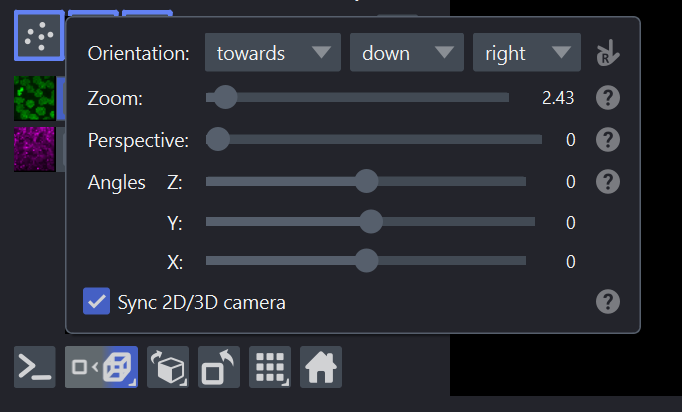
GUI — Camera popup#
Right-click the 2D/3D toggle button in the viewer toolbar to open the camera popup. This popup contains:
Camera orientation settings (see Axis directions, data, and handedness).
Zoom controls (in 2D and 3D modes).
Perspective controls (in 3D mode).
Camera angles (in 3D mode).
The “Sync 2D/3D camera” checkbox to toggle between synced and separate modes.
API — Programmatic control#
# Switch to separate mode
viewer.scene.camera.synced = False

# Switch back to default synced mode
viewer.scene.camera.synced = True
Settings — Persistent preference#
You can change the default synced mode in Preferences → Application → Synced Camera. This setting is persisted across sessions and applies to all new viewers.
from napari.settings import get_settings

get_settings().application.synced_camera = False
The setting can also be set via the environment variable
NAPARI_APPLICATION_SYNCED_CAMERA.
Other camera properties#
Beyond the synced mode, the camera has several properties you can adjust programmatically:
# Center of the view (in world coordinates)
viewer.scene.camera.center = (0, 100, 200)

# Zoom level (pixels per world unit)
viewer.scene.camera.zoom = 4.0

# Euler angles for 3D rotation (only used in 3D mode)
viewer.scene.camera.angles = (30, 45, 0)

# Perspective (field of view) in 3D mode
viewer.scene.camera.perspective = 30
For more on axis orientation and handedness, see Axis directions, data, and handedness. For details on 3D interaction and ray casting, see 3D interactivity. For a tour of the viewer interface, see Tour of the napari viewer.