
Layer units impact rendering#
This example demonstrates how units can impact rendering in napari. Two layers are added with different scales, however by specifying the units, napari is able to render them in the same physical space using the unit-aware library Pint [1]. The first layer is in nanometers and the second layer is in micrometers, but they are rendered in the same physical space because 1 μm = 1000 nm. Units also affect the scale bar, which will display the correct physical unit automatically.
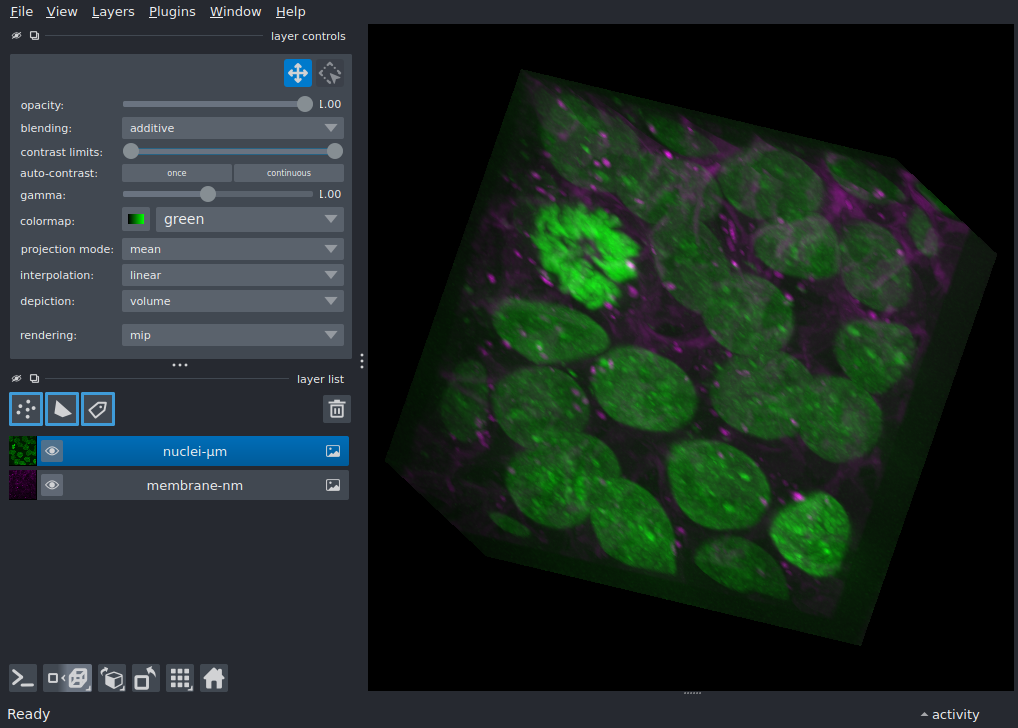
import skimage

import napari

data = skimage.data.cells3d()

membrane = data[:, 0]
nuclei = data[:, 1]

viewer = napari.Viewer()
viewer.scale_bar.visible = True
viewer.add_image(
    membrane,
    name='membrane-nm',
    units=('nm', 'nm', 'nm'),
    scale=(210, 70, 70),
    colormap='magenta'
)
viewer.add_image(
    nuclei,
    name='nuclei-μm',
    units=('μm', 'μm', 'μm'),
    scale=(0.210, 0.07, 0.07),
    colormap='green',
    blending='additive'
)

viewer.dims.ndisplay = 3
viewer.scene.camera.angles = (-20, 20, -20)
viewer.fit_to_view()

if __name__ == '__main__':
    napari.run()