
Set multiscale resolution level#
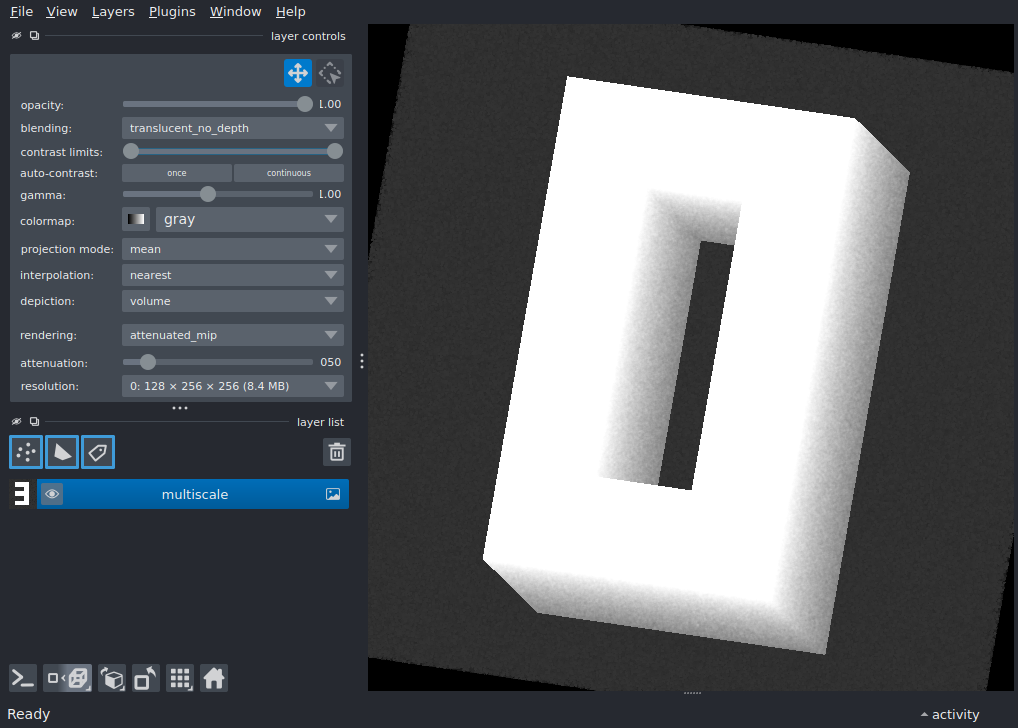
Demonstrates the locked_data_level feature, which lets you lock a
multiscale image to a specific resolution level instead of letting napari
choose automatically.
Each level has its index number drawn into every slice so you can immediately tell which resolution is being rendered.
import argparse

import numpy as np

import napari

# -- 5x3 bitmap font for digits 0-9 ----------------------------------------
_DIGITS = {
    0: [0b111, 0b101, 0b101, 0b101, 0b111],
    1: [0b010, 0b110, 0b010, 0b010, 0b111],
    2: [0b111, 0b001, 0b111, 0b100, 0b111],
    3: [0b111, 0b001, 0b111, 0b001, 0b111],
    4: [0b101, 0b101, 0b111, 0b001, 0b001],
    5: [0b111, 0b100, 0b111, 0b001, 0b111],
    6: [0b111, 0b100, 0b111, 0b101, 0b111],
    7: [0b111, 0b001, 0b010, 0b010, 0b010],
    8: [0b111, 0b101, 0b111, 0b101, 0b111],
    9: [0b111, 0b101, 0b111, 0b001, 0b111],
}


def _stamp_digit(arr, digit, scale=1):
    """Draw *digit* centred on every YX slice of a 3D array.

    Parameters
    ----------
    arr : np.ndarray
        3D array (Z, Y, X) to draw into (modified in-place).
    digit : int
        Single digit 0-9.
    scale : int
        Pixel multiplier for the 5x3 glyph.
    """
    rows = _DIGITS[digit]
    glyph_h, glyph_w = 5 * scale, 3 * scale
    y0 = (arr.shape[1] - glyph_h) // 2
    x0 = (arr.shape[2] - glyph_w) // 2
    for r, bits in enumerate(rows):
        for c in range(3):
            if bits & (1 << (2 - c)):
                y_start = y0 + r * scale
                x_start = x0 + c * scale
                arr[:, y_start : y_start + scale, x_start : x_start + scale] = 255


# -- Parse arguments --------------------------------------------------------
parser = argparse.ArgumentParser(description='Multiscale volume demo')
parser.add_argument(
    '--labels',
    action='store_true',
    help='Add as a Labels layer instead of Image',
)
args = parser.parse_args()

# -- Build a 4-level 3D multiscale pyramid ----------------------------------
shapes = [(128, 256, 256), (64, 128, 128), (32, 64, 64), (16, 32, 32)]
scales = [40, 20, 10, 5]
multiscale_data = []
for i, (shape, sc) in enumerate(zip(shapes, scales, strict=True)):
    if args.labels:
        arr = np.zeros(shape, dtype=np.uint8)
    else:
        rng = np.random.default_rng(i)
        arr = rng.integers(0, 50, size=shape, dtype=np.uint8)
    _stamp_digit(arr, i, scale=sc)
    multiscale_data.append(arr)

# -- Open viewer in 3D and add the layer -----------------------------------
viewer = napari.Viewer(ndisplay=3)
if args.labels:
    layer = viewer.add_labels(
        multiscale_data, name='multiscale', multiscale=True
    )
else:
    layer = viewer.add_image(
        multiscale_data,
        name='multiscale',
        multiscale=True,
        rendering='attenuated_mip',
        interpolation3d='nearest',
    )

# Tilt the camera for a better 3D view
viewer.scene.camera.angles = (-10, 10, -10)

# -- Lock to the highest resolution level so you can see the "0" digit.
# Without locking, 3D mode defaults to the coarsest level (digit "3").
layer.locked_data_level = 0

# To restore automatic level selection:
# layer.locked_data_level = None

if __name__ == '__main__':
    napari.run()