
Affine Transforms 3D#
Translate and rotate an object in napari using an affine transformation. Affine for 3D objects is represented as a 4x4 matrix, while affine for 2D objects is represented as a 3x3 matrix. For 3D objects the 4 columns represent the rotate, scale, shear, and translate respectively, and by default, affine is set as a 4x4 identity matrix. By modifying the respective values in this matrix, which is represented as a numpy array, we can move and adjust objects in the napari viewer.
Extra packages required
This example requires additional packages that are not available in typical
napari installations.
For this example to work in recommended napari installations,
you will need to install additional packages: meshio.
See the plugin manager guide
for ways to install additional packages from within napari.
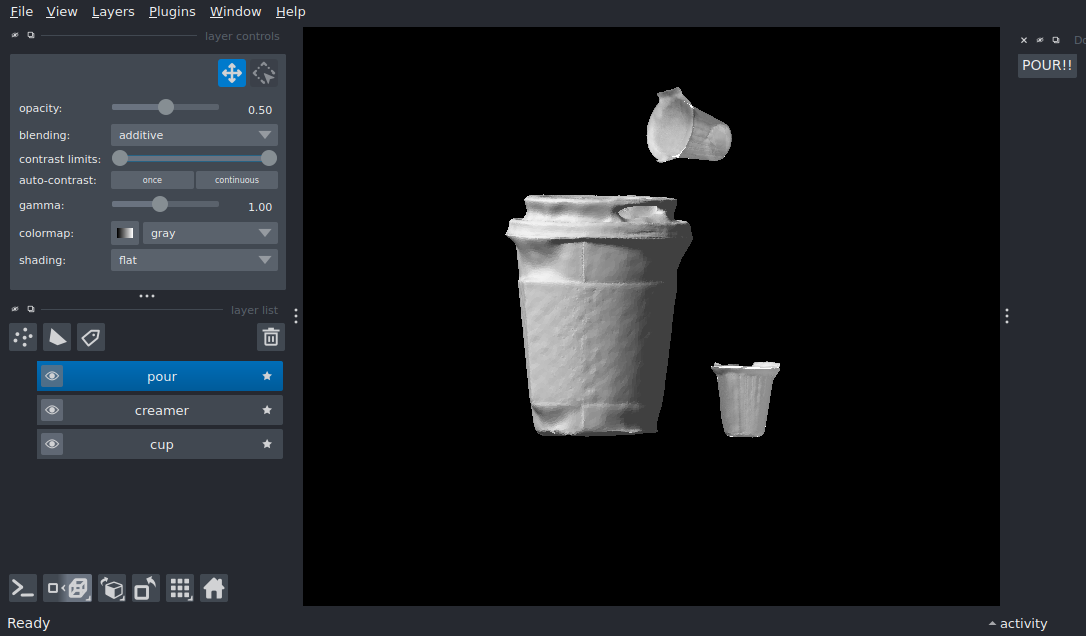
import meshio
import numpy as np
import pooch
from magicgui import magicgui

import napari

cup_path = pooch.retrieve(
    url="https://raw.githubusercontent.com/8bitbiscuit/cup_and_creamer/main/cup.stl",
    known_hash='b6162298f86c94ebb276eb5f0544409996a8ee81fff9627a2bd4b71309835014',
)
creamer_path = pooch.retrieve(
    url="https://raw.githubusercontent.com/8bitbiscuit/cup_and_creamer/main/creamer.stl",
    known_hash='122256d942694cf40fc1a186a346cda0b31a03fbdec61ea8a351c915f3d0d6ed',
)

# Use meshio to read in stl files
cup_mesh = meshio.read(cup_path)
creamer_mesh = meshio.read(creamer_path)

# Create tuples using the data read in from meshio to be viewed by napari as surfaces
cup_data = (cup_mesh.points, cup_mesh.cells[0].data)
creamer_data = (creamer_mesh.points, creamer_mesh.cells[0].data)

viewer = napari.Viewer()

# Define an original affine transformation to be position of surface upon being loaded into viewer
# Otherwise both objects would be loaded in on the origin in the viewer by default and be on top of one another
og_affine = np.array(
    [
        [1.0, 0.0, 0.0, 0.0],
        [0.0, 1.0, 0.0, 0.0],
        [0.0, 0.0, 1.0, -0.1],
        [0.0, 0.0, 0.0, 1.0],
    ]
)

# Add in the two surfaces we read using meshio
viewer.add_surface(cup_data, name="cup")
viewer.add_surface(
    creamer_data, affine=og_affine, opacity=0.5, blending="additive", name="creamer"
)


@magicgui(call_button='POUR!!')
def pour_creamer():
    # Define a new affine transform for the creamer surface, where it is moved up and at an angle to be 'poured' into the cup
    new_affine = np.array(
        [
            [1.0, 0.0, 0.0, 0.0],
            [0.0, 0.23, -0.97, 0.15],
            [0.0, 0.97, 0.23, -0.08],
            [0.0, 0.0, 0.0, 1.0],
        ]
    )

    # Add a transformed surface with the new affine transform
    # This surface is identical to the other creamer object, save for the new affine transformation
    viewer.add_surface(
        creamer_data, affine=new_affine, opacity=0.5, blending="additive", name="pour"
    )


# Set viewer camera angles and zoom
viewer.dims.ndisplay = 3
viewer.scene.camera.angles = (180, -27, 5)

# Add button to create new layer with transformed object using magicgui
viewer.window.add_dock_widget(pour_creamer)

pour_creamer()

viewer.fit_to_view()

if __name__ == "__main__":
    napari.run()