
Cell tracking example#
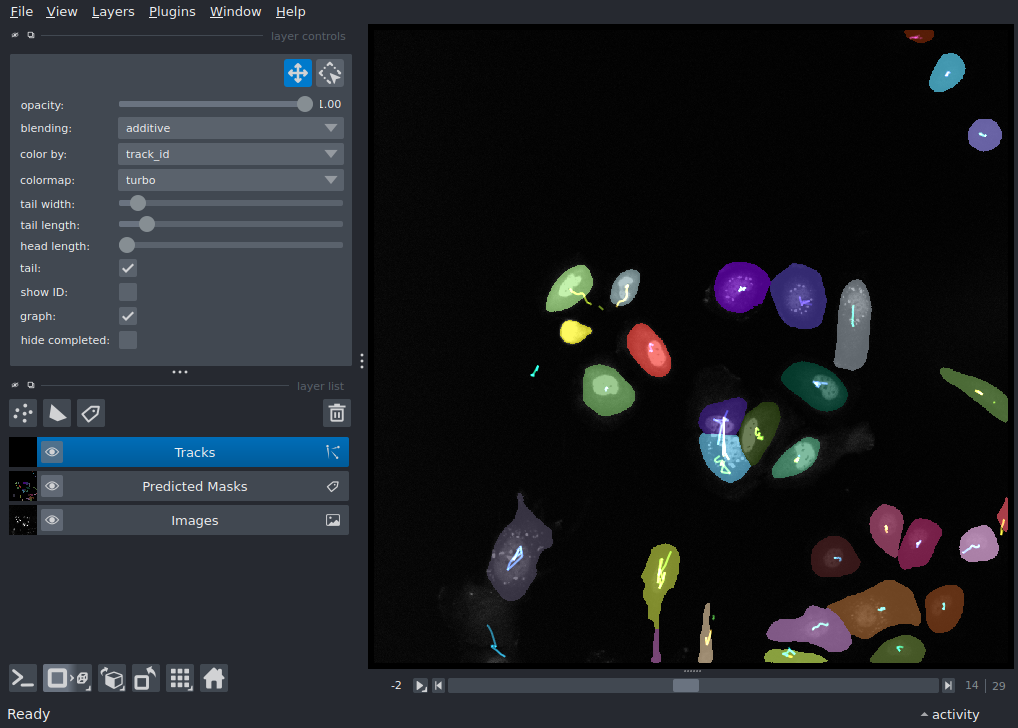
This example demonstrates how the track layer is used for visualizing cell tracking data, by displaying 2D + time dataset of cells with colored properties for track-id.
Thanks to Dr. Alessia Ruggieri and Philipp Klein, Centre for Integrative Infectious Disease Research (CIID), University Hospital Heidelberg, Germany for the data. You can find the data on: https://doi.org/10.5281/zenodo.15597019
Extra packages required
This example requires additional packages that are not available in typical
napari installations.
For this example to work in recommended napari installations,
you will need to install additional packages: trackastra.
See the plugin manager guide
for ways to install additional packages from within napari.
Downloading...
From: https://drive.google.com/uc?id=1tuHI_io67gVdFZBA5E97fXrAWaxI2cqi
To: /home/runner/work/docs/docs/.cache/napari cell tracking example/tmpyvlr_bh4

  0%|          | 0.00/455k [00:00<?, ?B/s]
100%|██████████| 455k/455k [00:00<00:00, 4.10MB/s]
100%|██████████| 455k/455k [00:00<00:00, 4.09MB/s]
Downloading...
From: https://drive.google.com/uc?id=1qhAbIZiEKfo_a38YFtw7KJ3JjEhicDeJ
To: /home/runner/work/docs/docs/.cache/napari_cell_tracking_example/tmp_3awbjsq

  0%|          | 0.00/15.7M [00:00<?, ?B/s]
  3%|▎         | 524k/15.7M [00:00<00:02, 5.10MB/s]
 30%|██▉       | 4.72M/15.7M [00:00<00:00, 25.7MB/s]
 47%|████▋     | 7.34M/15.7M [00:00<00:00, 21.8MB/s]
 87%|████████▋ | 13.6M/15.7M [00:00<00:00, 20.6MB/s]
100%|██████████| 15.7M/15.7M [00:00<00:00, 23.3MB/s]

/tmp/tmpnuz75bm3/general_2d.zip:   0%|          | 0.00/38.0M [00:00<?, ?iB/s]
/tmp/tmpnuz75bm3/general_2d.zip:  12%|█▏        | 4.59M/38.0M [00:00<00:00, 48.2MiB/s]
/tmp/tmpnuz75bm3/general_2d.zip:  63%|██████▎   | 24.1M/38.0M [00:00<00:00, 140MiB/s]
/tmp/tmpnuz75bm3/general_2d.zip: 100%|██████████| 38.0M/38.0M [00:00<00:00, 147MiB/s]

Extracting features:   0%|          | 0/30 [00:00<?, ?it/s]
Extracting features:  20%|██        | 6/30 [00:00<00:00, 57.97it/s]
Extracting features:  43%|████▎     | 13/30 [00:00<00:00, 59.74it/s]
Extracting features:  67%|██████▋   | 20/30 [00:00<00:00, 60.22it/s]
Extracting features:  90%|█████████ | 27/30 [00:00<00:00, 60.20it/s]
Extracting features: 100%|██████████| 30/30 [00:00<00:00, 60.41it/s]

Building windows:   0%|          | 0/27 [00:00<?, ?it/s]
Building windows: 100%|██████████| 27/27 [00:00<00:00, 20635.24it/s]

Computing associations:   0%|          | 0/27 [00:00<?, ?it/s]
Computing associations:  15%|█▍        | 4/27 [00:00<00:00, 36.91it/s]
Computing associations:  30%|██▉       | 8/27 [00:00<00:00, 37.27it/s]
Computing associations:  44%|████▍     | 12/27 [00:00<00:00, 37.82it/s]
Computing associations:  59%|█████▉    | 16/27 [00:00<00:00, 37.24it/s]
Computing associations:  74%|███████▍  | 20/27 [00:00<00:00, 36.83it/s]
Computing associations:  89%|████████▉ | 24/27 [00:00<00:00, 37.10it/s]
Computing associations: 100%|██████████| 27/27 [00:00<00:00, 37.49it/s]

  0%|          | 0/30 [00:00<?, ?it/s]
29 edges in frame 0  Total edges: 29:   0%|          | 0/30 [00:00<?, ?it/s]
25 edges in frame 1  Total edges: 54:   0%|          | 0/30 [00:00<?, ?it/s]
25 edges in frame 2  Total edges: 79:   0%|          | 0/30 [00:00<?, ?it/s]
30 edges in frame 3  Total edges: 109:   0%|          | 0/30 [00:00<?, ?it/s]
29 edges in frame 4  Total edges: 138:   0%|          | 0/30 [00:00<?, ?it/s]
29 edges in frame 5  Total edges: 167:   0%|          | 0/30 [00:00<?, ?it/s]
29 edges in frame 6  Total edges: 196:   0%|          | 0/30 [00:00<?, ?it/s]
31 edges in frame 7  Total edges: 227:   0%|          | 0/30 [00:00<?, ?it/s]
31 edges in frame 8  Total edges: 258:   0%|          | 0/30 [00:00<?, ?it/s]
30 edges in frame 9  Total edges: 288:   0%|          | 0/30 [00:00<?, ?it/s]
29 edges in frame 10  Total edges: 317:   0%|          | 0/30 [00:00<?, ?it/s]
28 edges in frame 11  Total edges: 345:   0%|          | 0/30 [00:00<?, ?it/s]
27 edges in frame 12  Total edges: 372:   0%|          | 0/30 [00:00<?, ?it/s]
28 edges in frame 13  Total edges: 400:   0%|          | 0/30 [00:00<?, ?it/s]
31 edges in frame 14  Total edges: 431:   0%|          | 0/30 [00:00<?, ?it/s]
31 edges in frame 15  Total edges: 462:   0%|          | 0/30 [00:00<?, ?it/s]
30 edges in frame 16  Total edges: 492:   0%|          | 0/30 [00:00<?, ?it/s]
30 edges in frame 17  Total edges: 522:   0%|          | 0/30 [00:00<?, ?it/s]
31 edges in frame 18  Total edges: 553:   0%|          | 0/30 [00:00<?, ?it/s]
31 edges in frame 19  Total edges: 584:   0%|          | 0/30 [00:00<?, ?it/s]
30 edges in frame 20  Total edges: 614:   0%|          | 0/30 [00:00<?, ?it/s]
33 edges in frame 21  Total edges: 647:   0%|          | 0/30 [00:00<?, ?it/s]
32 edges in frame 22  Total edges: 679:   0%|          | 0/30 [00:00<?, ?it/s]
31 edges in frame 23  Total edges: 710:   0%|          | 0/30 [00:00<?, ?it/s]
30 edges in frame 24  Total edges: 740:   0%|          | 0/30 [00:00<?, ?it/s]
28 edges in frame 25  Total edges: 768:   0%|          | 0/30 [00:00<?, ?it/s]
28 edges in frame 26  Total edges: 796:   0%|          | 0/30 [00:00<?, ?it/s]
28 edges in frame 27  Total edges: 824:   0%|          | 0/30 [00:00<?, ?it/s]
27 edges in frame 28  Total edges: 851:   0%|          | 0/30 [00:00<?, ?it/s]


Greedily matched edges:   0%|          | 0/845 [00:00<?, ?it/s]
Greedily matched edges: 100%|██████████| 845/845 [00:00<00:00, 247067.75it/s]

Converting graph to CTC results:   0%|          | 0/53 [00:00<?, ?it/s]
Converting graph to CTC results: 100%|██████████| 53/53 [00:00<00:00, 153520.80it/s]

Computing centroids:   0%|          | 0/30 [00:00<?, ?it/s]
Computing centroids:  70%|███████   | 21/30 [00:00<00:00, 208.10it/s]


Converting CTC to napari tracks:   0%|          | 0/53 [00:00<?, ?it/s]
from pathlib import Path

import numpy as np
import pooch
import tifffile
from trackastra.model import Trackastra
from trackastra.tracking import ctc_to_napari_tracks, graph_to_ctc

import napari

# Create temporary directory
tmp_dir = Path(pooch.os_cache('napari-cell-tracking-example'))
tmp_dir.mkdir(parents=True, exist_ok=True)

# Extract silver truth data for trackastra
st_url = "doi:10.5281/zenodo.15852284/masks_pred.npz"
st_path = pooch.retrieve(
    url=st_url,
    fname="masks_pred.npz",
    known_hash=None,
    path=pooch.os_cache("napari cell tracking example")
)

# Extract raw tif files for trackastra
tif_url = "doi:10.5281/zenodo.17643282/01(1).zip"
tif_file = pooch.retrieve(
    url=tif_url,
    fname="01(1).zip",
    known_hash=None,
    path=pooch.os_cache("napari_cell_tracking_example"),
    processor=pooch.Unzip(),
)

# Load the downloaded masks
masks_npz = np.load(st_path)
masks = masks_npz['masks']

# Sort through images and stack them
imgs = sorted(tif_file)

images = np.stack([
        tifffile.imread(fn) for fn in imgs
        ])

# Initiate trackastra model
model = Trackastra.from_pretrained("general_2d", device='cpu')

# Generate tracks
graph, *_ = model.track(imgs=images, masks=masks, mode='greedy')
tracks_df, tracked_masks = graph_to_ctc(graph=graph, masks_original=masks)

napari_tracks, napari_graph = ctc_to_napari_tracks(segmentation=tracked_masks, man_track=tracks_df)

# Add Napari viewer
viewer = napari.Viewer()
viewer.add_image(images, name='Images')
viewer.add_labels(masks, name='Predicted Masks')
viewer.add_tracks(napari_tracks, graph=napari_graph, name="Tracks")

if __name__ == "__main__":
    napari.run()
Total running time of the script: (0 minutes 12.646 seconds)