
Colorbars and auto-tiling of overlays in grid mode#
Demonstrates the colorbar overlay for each layer, as well as the auto-tiling of overlays. In addition, uses the gridded and position property of the scale bar to show that overlays can also be auto-tiled per grid cell. This grid approach also demonstrates that colorbars are linked to each layer in the grid, and by toggling the grid mode off, the auto-tiling behavior can be seen.
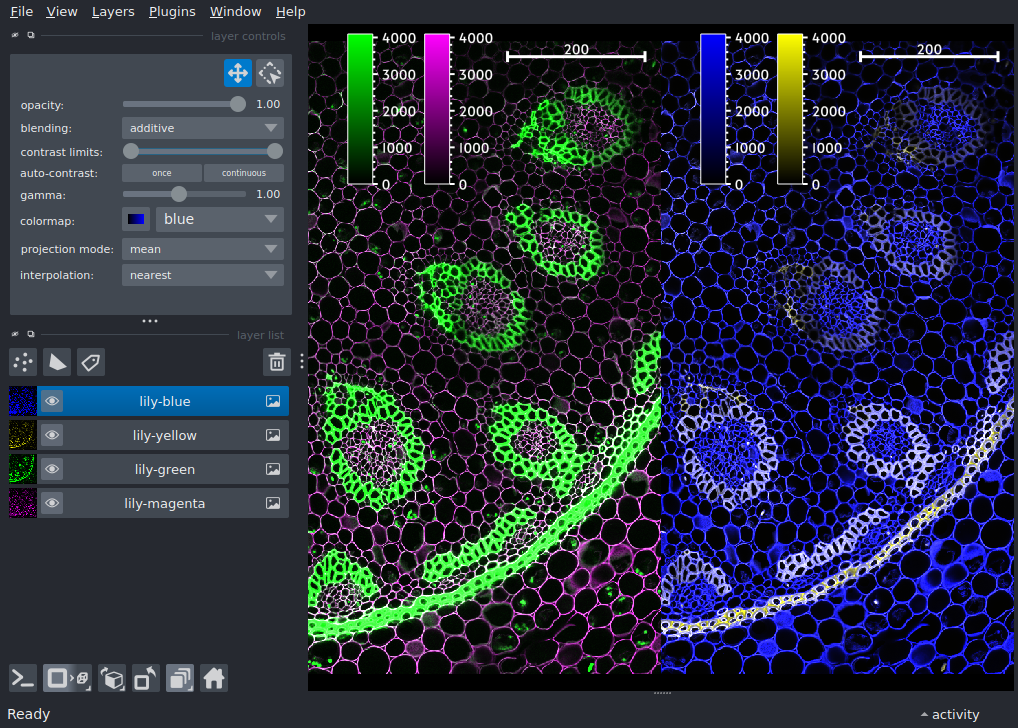
import napari

viewer = napari.Viewer()
layers = viewer.open_sample('napari', 'lily')

# enable color bars, note that the colorbars will also tile according to
# each layer in the grid
for layer in layers:
    layer.colorbar.visible = True

# set the scale bar to gridded mode so it appears in each grid box
# have the position overlap with the default colorbar position
viewer.canvas.overlays.scale_bar.visible = True
viewer.canvas.overlays.scale_bar.position = 'top_right'
viewer.canvas.overlays.scale_bar.gridded = True

# enable grid with stride 2 to get layers split two-by-two
viewer.canvas.grid.enabled = True
viewer.canvas.grid.stride = 2
viewer.fit_to_view()

if __name__ == '__main__':
    napari.run()