{
"name": "napari-zelda",
"display_name": "napari-zelda",
"visibility": "public",
"icon": "",
"categories": [],
"schema_version": "0.2.1",
"on_activate": null,
"on_deactivate": null,
"contributions": {
"commands": [
{
"id": "napari-zelda.launch_ZELDA",
"title": "launch_ZELDA",
"python_name": "napari_zelda.napari_zelda:launch_ZELDA",
"short_title": null,
"category": null,
"icon": null,
"enablement": null
}
],
"readers": null,
"writers": null,
"widgets": [
{
"command": "napari-zelda.launch_ZELDA",
"display_name": "launch_ZELDA",
"autogenerate": false
}
],
"sample_data": null,
"themes": null,
"menus": {},
"submenus": null,
"keybindings": null,
"configuration": []
},
"package_metadata": {
"metadata_version": "2.4",
"name": "napari-zelda",
"version": "0.1.12",
"dynamic": [
"author",
"download-url",
"license-file",
"summary"
],
"platform": null,
"supported_platform": null,
"summary": "ZELDA: a 3D Image Segmentation and Parent-Child relation plugin for microscopy image analysis in napari",
"description": "# napari-zelda\n\n[](https://github.com/RoccoDAnt/napari-zelda/raw/master/LICENSE)\n[](https://pypi.org/project/napari-zelda)\n[](https://python.org)\n[](https://github.com/RoccoDAnt/napari-zelda/actions)\n[](https://codecov.io/gh/RoccoDAnt/napari-zelda)\n\n## ZELDA: a 3D Image Segmentation and Parent-Child relation plugin for microscopy image analysis in napari\n#### Authors: Rocco D'Antuono, Giuseppina Pisignano\n\n###### Article: Front. Comput. Sci., 04 January 2022 | https://doi.org/10.3389/fcomp.2021.796117\n\n###### Examples of 2D and 3D data sets: [https://doi.org/10.5281/zenodo.5651284](https://zenodo.org/record/5651284#.YYgn_WDP2Ch)\n----------------------------------\n\n## What you can do with ZELDA plugin for napari\nThe plugin can be used to analyze 2D/3D image data sets. \nMultidimensional images (each channel corresponding to a napari layer) can be used to:\n\n1. Segment objects such as cells and organelles in 2D/3D.\n\n2. Segment two populations in 2D/3D (e.g. cells and organelles, nuclei and nuclear spots, tissue structures and cells) establishing the \"Parent-Child\" relation: count how many mitochondria are contained in each cell, how many spots localize in every nucleus, how many cells are within a tissue compartment.\n\n Example: cell cytoplasms (parent objects) and mitochondria (child objects)\n 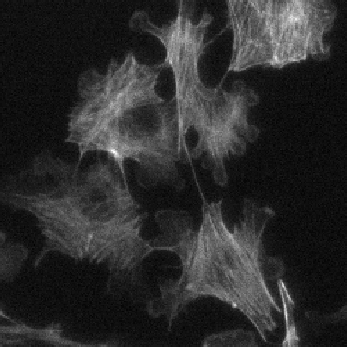
**Actin** | 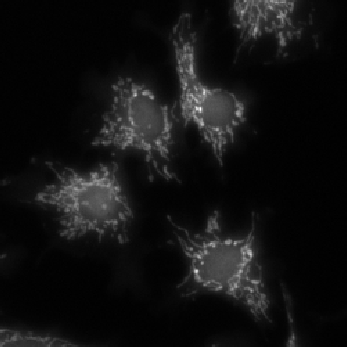
**Mitochondria**| 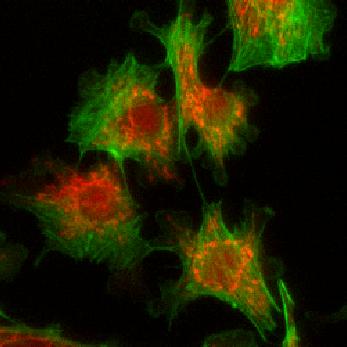
**Merge**\n ------ | ------| -----\n 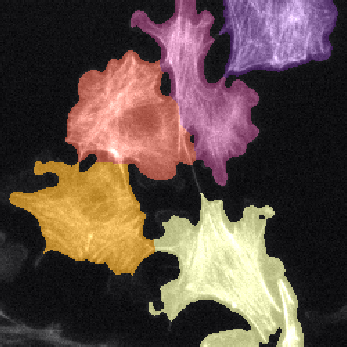
**Parent cell cytoplasms** | 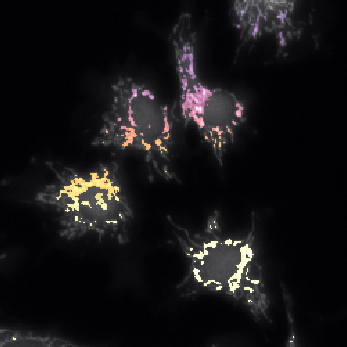
**Children mitochondria**| 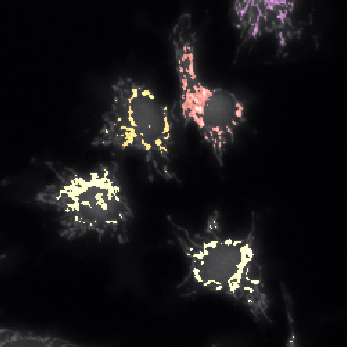
**Children labelled by Parents**\n\nThe images shown above are available in the [**docs**](https://github.com/RoccoDAnt/napari-zelda/tree/main/docs) folder of this repository and were segmented using ZELDA with the following parameters:\n\n\n | **Parent objects** | **GB: sigma=2.0-> Th_parents=60.0-> DistMap-> Maxima: min_dist=10** |\n | -----| ----|\n | **Children objects** | **GB: sigma=0.3-> Th_children=450.0 -> DistMap-> Maxima: min_dist=2**|\n\nFor small monitors it may be convenient to float the protocol panel\n\n |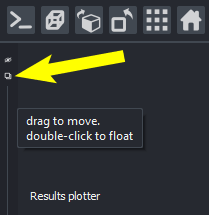
**Float a panel in napari** |\n ------ |\n\n3. Plot results within napari interface.\n\n 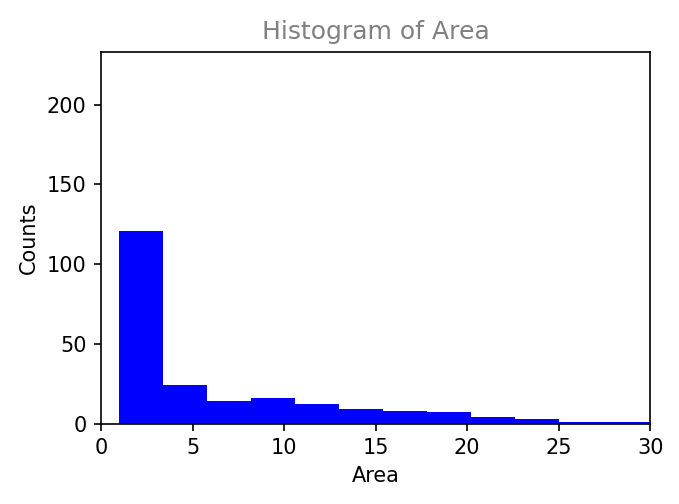
**Histogram** | 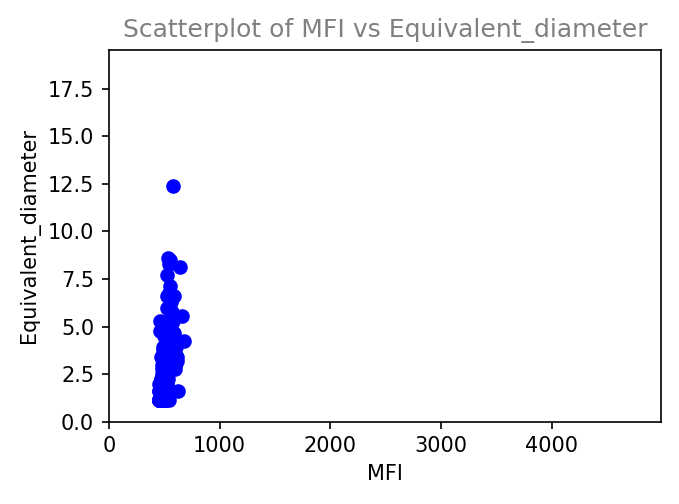
**Scatterplot**|\n ------ | ------|\n\n4. Customize an image analysis workflow in graphical mode (no scripting knowledge required).\n\n | 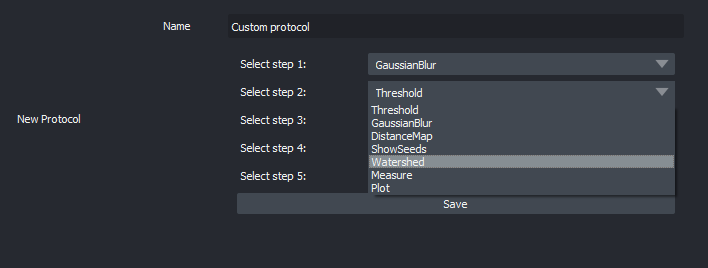
**Custom image analysis workflow** |\n ------ |\n\n5. Import and Export Protocols (image analysis workflows) in graphical mode (share with the community!).\n\n | 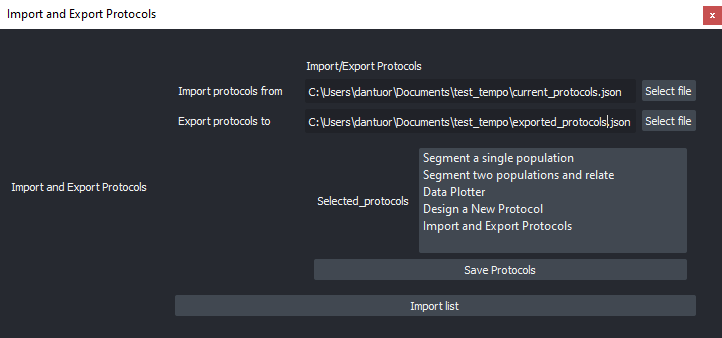
**Import and Export of ZELDA Protocols** |\n ------ |\n\n## Installation\n\n**Option A.** The easiest option is to use the napari interface to install ZELDA (make sure napari!=0.4.11):\n1. Plugins / Install/Uninstall Package(s)\n\n 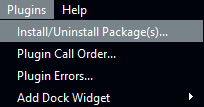\n\n2. Choose ZELDA\n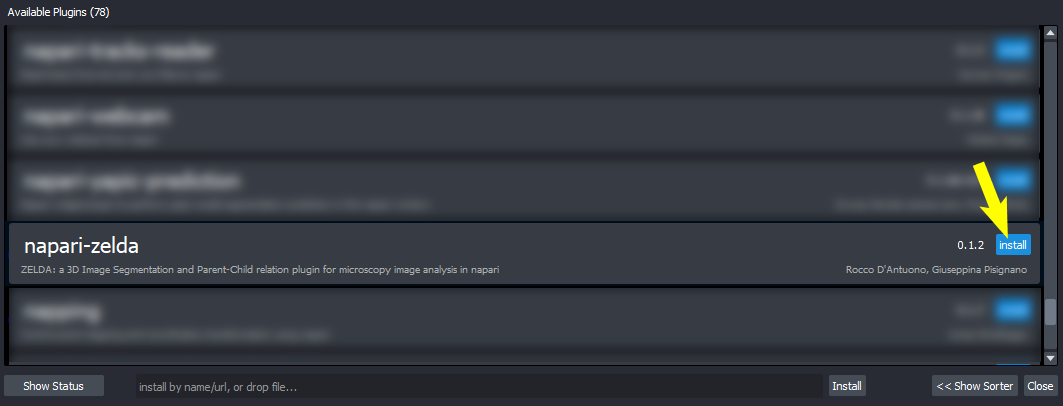\n\n3. ZELDA is installed\n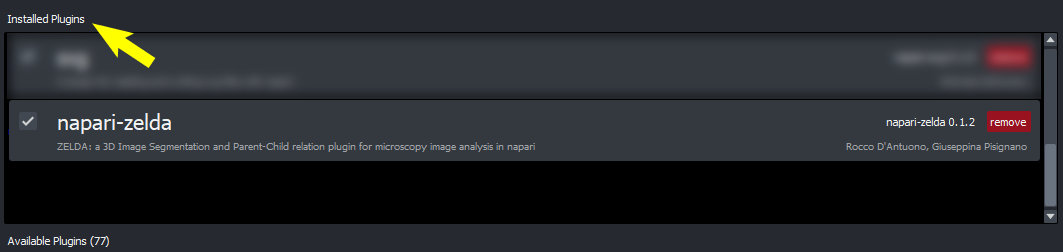\n\n4. Launch ZELDA\n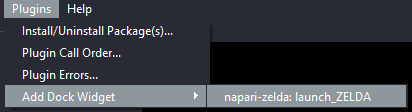\n\n\n**Option B.** You can install `napari-zelda` also via [pip]. For the best experience, create a conda environment and use napari!=0.4.11, using the following instructions:\n\n conda create -y -n napari-env python=3.8 \n conda activate napari-env\n conda install napari pyqt \n pip install napari-zelda \n\n\n**Option C.** Alternatively, clone the repository and install locally via [pip]:\n\n pip install -e .\n\n**Option D.** Get the latest code with [git](https://git-scm.com/book/en/v2/Getting-Started-Installing-Git) and [pip]:\n\n conda create -y -n napari-env python=3.8 git\n conda activate napari-env\n conda install napari pyqt\n pip install git+https://github.com/RoccoDAnt/napari-zelda.git\n\n\n## Specifications\n\nThis [napari] plugin was generated with [Cookiecutter] using with [@napari]'s [cookiecutter-napari-plugin] template.\n\nThe GUI has been developed using [magicgui](https://github.com/napari/magicgui) widgets, while the image analysis and processing include functions from [scikit-image](https://scikit-image.org/), [SciPy](https://scipy.org/), and [NumPy](https://numpy.org/). Results are handled with [pandas](https://pandas.pydata.org/) and [datatable](https://datatable.readthedocs.io/en/latest/). Plots are obtained with [matplotlib](https://matplotlib.org/). \n\n\n\n## Contributing\n\nContributions are welcome. Tests can be run with [tox], please ensure\nthe coverage at least stays the same before you submit a pull request.\n\nUsers can add new protocol steps to their local installation using [magicgui](https://github.com/napari/magicgui) widgets.\nCode can be added at the end of napari_zelda.py file:\n\n>###Add here new functionalities for ZELDA ###\n>\n>###@magicgui(layout=\"vertical\")\n>\n>###def new_functionality_widget(viewer: 'napari.Viewer'):\n>\n>###...\n>\n>###\n>\n>###End###\n\n\n\n## License\n\nDistributed under the terms of the [BSD-3] license,\n\"napari-zelda\" is free and open source software\n\n## Issues\n\nIf you encounter any problems, please [file an issue] along with a detailed description.\n\n[napari]: https://github.com/napari/napari\n[Cookiecutter]: https://github.com/audreyr/cookiecutter\n[@napari]: https://github.com/napari\n[MIT]: http://opensource.org/licenses/MIT\n[BSD-3]: http://opensource.org/licenses/BSD-3-Clause\n[GNU GPL v3.0]: http://www.gnu.org/licenses/gpl-3.0.txt\n[GNU LGPL v3.0]: http://www.gnu.org/licenses/lgpl-3.0.txt\n[Apache Software License 2.0]: http://www.apache.org/licenses/LICENSE-2.0\n[Mozilla Public License 2.0]: https://www.mozilla.org/media/MPL/2.0/index.txt\n[cookiecutter-napari-plugin]: https://github.com/napari/cookiecutter-napari-plugin\n\n[file an issue]: https://github.com/RoccoDAnt/napari-zelda/issues\n\n[napari]: https://github.com/napari/napari\n[tox]: https://tox.readthedocs.io/en/latest/\n[pip]: https://pypi.org/project/pip/\n[PyPI]: https://pypi.org/\n",
"description_content_type": "text/markdown",
"keywords": null,
"home_page": "https://github.com/RoccoDAnt/napari-zelda",
"download_url": "https://github.com/RoccoDAnt/napari-zelda/archive/refs/tags/v0.1.12.tar.gz",
"author": "Rocco D'Antuono, Giuseppina Pisignano",
"author_email": "rocco.dantuono@hotmail.it",
"maintainer": null,
"maintainer_email": null,
"license": "BSD-3-Clause",
"classifier": [
"Development Status :: 3 - Alpha",
"Intended Audience :: Science/Research",
"Framework :: napari",
"Topic :: Scientific/Engineering",
"Programming Language :: Python",
"Programming Language :: Python :: 3",
"Programming Language :: Python :: 3.7",
"Operating System :: OS Independent",
"License :: OSI Approved :: BSD License"
],
"requires_dist": [
"datatable",
"json5",
"magicgui",
"matplotlib>=3.4.3",
"napari!=0.4.11",
"napari-plugin-engine>=0.1.4",
"numpy",
"pandas",
"scikit-image",
"scipy"
],
"requires_python": ">=3.7",
"requires_external": null,
"project_url": null,
"provides_extra": null,
"provides_dist": null,
"obsoletes_dist": null
},
"npe1_shim": true
}