{
"name": "napari-bbox",
"display_name": "Bounding Box",
"visibility": "public",
"icon": null,
"categories": [],
"schema_version": "0.3.0",
"on_activate": null,
"on_deactivate": null,
"contributions": {
"commands": [
{
"id": "napari-bbox.get_reader",
"title": "Open data with napari nD Bounding Box",
"python_name": "napari_bbox._reader:napari_get_reader",
"short_title": null,
"category": null,
"icon": null,
"enablement": null
},
{
"id": "napari-bbox.create_bounding_box_layer_widget",
"title": "Create Bounding Box Layer",
"python_name": "napari_bbox._widget:BoundingBoxCreator",
"short_title": null,
"category": null,
"icon": null,
"enablement": null
}
],
"readers": [
{
"command": "napari-bbox.get_reader",
"filename_patterns": [
"*.csv"
],
"accepts_directories": false
}
],
"writers": null,
"widgets": [
{
"command": "napari-bbox.create_bounding_box_layer_widget",
"display_name": "Bounding Box Creator",
"autogenerate": false,
"default_dock_area": "right",
"tabify": false
}
],
"sample_data": null,
"themes": null,
"menus": {},
"submenus": null,
"keybindings": null,
"configurations": {}
},
"package_metadata": {
"metadata_version": "2.4",
"name": "napari-bbox",
"version": "0.2.0",
"dynamic": [
"license-file"
],
"platform": null,
"supported_platform": null,
"summary": "A new layer for bounding boxes in 2+ dimensions",
"description": "# napari-bbox\n\n[](https://github.com/bauerdavid/napari-bbox/raw/main/LICENSE)\n[](https://pypi.org/project/napari-bbox)\n[](https://python.org)\n[](https://github.com/bauerdavid/napari-bbox/actions)\n[](https://codecov.io/gh/bauerdavid/napari-bbox)\n[](https://napari-hub.org/plugins/napari-bbox)\n\nA new layer for bounding boxes in 2+ dimensions\n\n> **Note**: This plugin was originally part of [Annotation Toolbox](https://www.napari-hub.org/plugins/napari-nD-annotator), and was separated to allow other plugins to utilize it.\n\n----------------------------------\n\n## Features\n\n- **A bounding box layer for napari** (`BoundingBoxLayer`) for axis-aligned boxes in\n 2D, 3D and higher dimensional data.\n- **Interactive editing in 2D**: draw, select, move and resize boxes.\n- **Interactive editing in 3D views**: select, move and resize existing boxes\n while the viewer is in 3D mode, see [Editing in 3D](#editing-in-3d).\n- **Undo and redo** of box edits, in 2D and in 3D, see [Undo and redo](#undo-and-redo).\n- **Features and text labels**: attach a features table to the boxes and display\n it as text, like in the napari points and shapes layers.\n- **Appearance**: edge color, edge width, face color, opacity and blending, set\n from the layer controls, plus a z-index per box to control which box is drawn\n on top.\n- **CSV import and export**, and a *Bounding Box Creator* widget to create, open\n and save layers, see [Reading and saving](#reading-and-saving).\n- Works with the standard layer actions of napari, such as **Duplicate Layer**.\n- Supports **napari 0.4.15 up to 0.10** and is tested against them on every change,\n see [Compatibility](#compatibility).\n\n## Demo\n\n### Drawing and editing boxes in 2D\n\n\n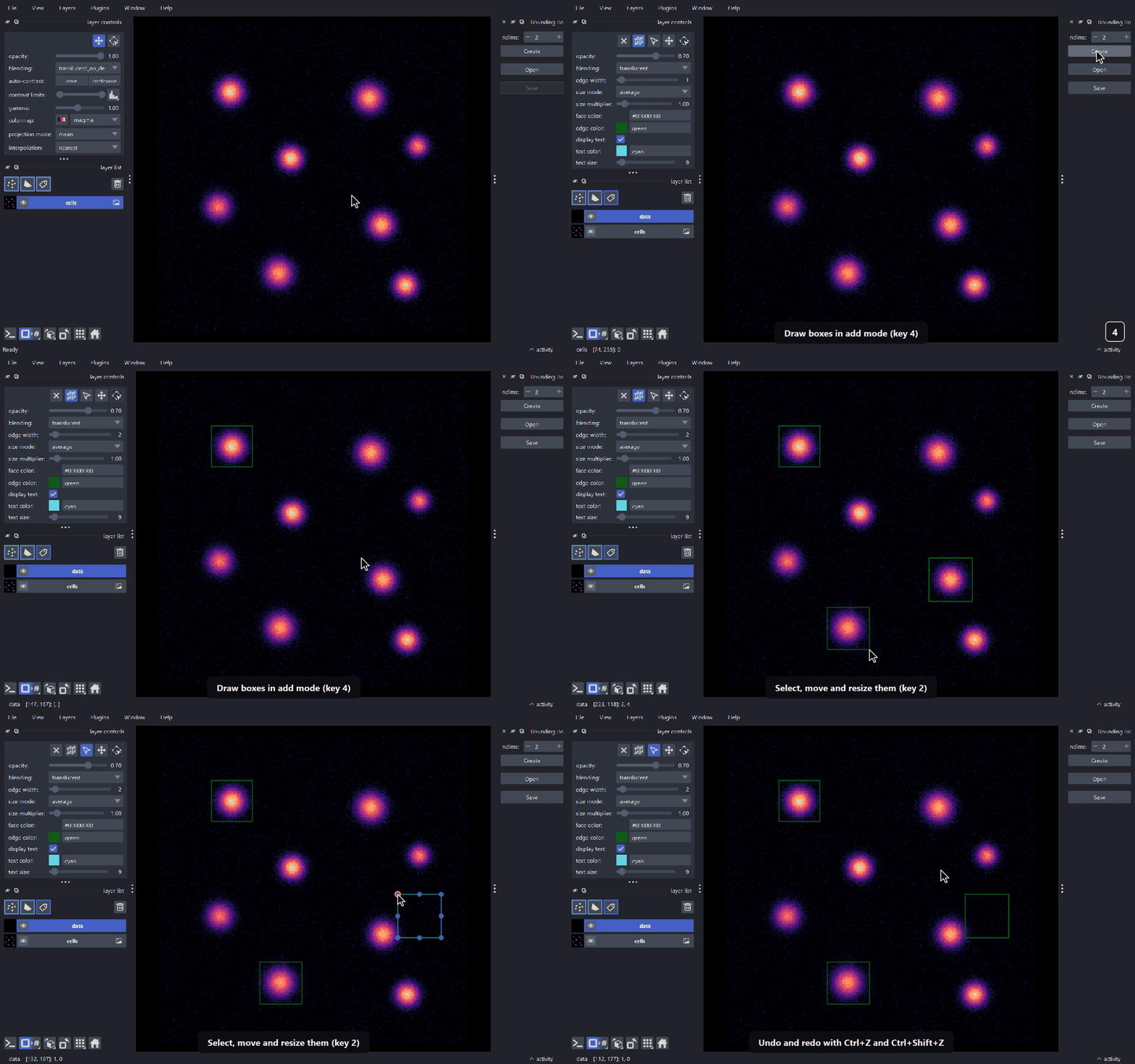\n\n\n### Editing boxes in 3D\n\n\n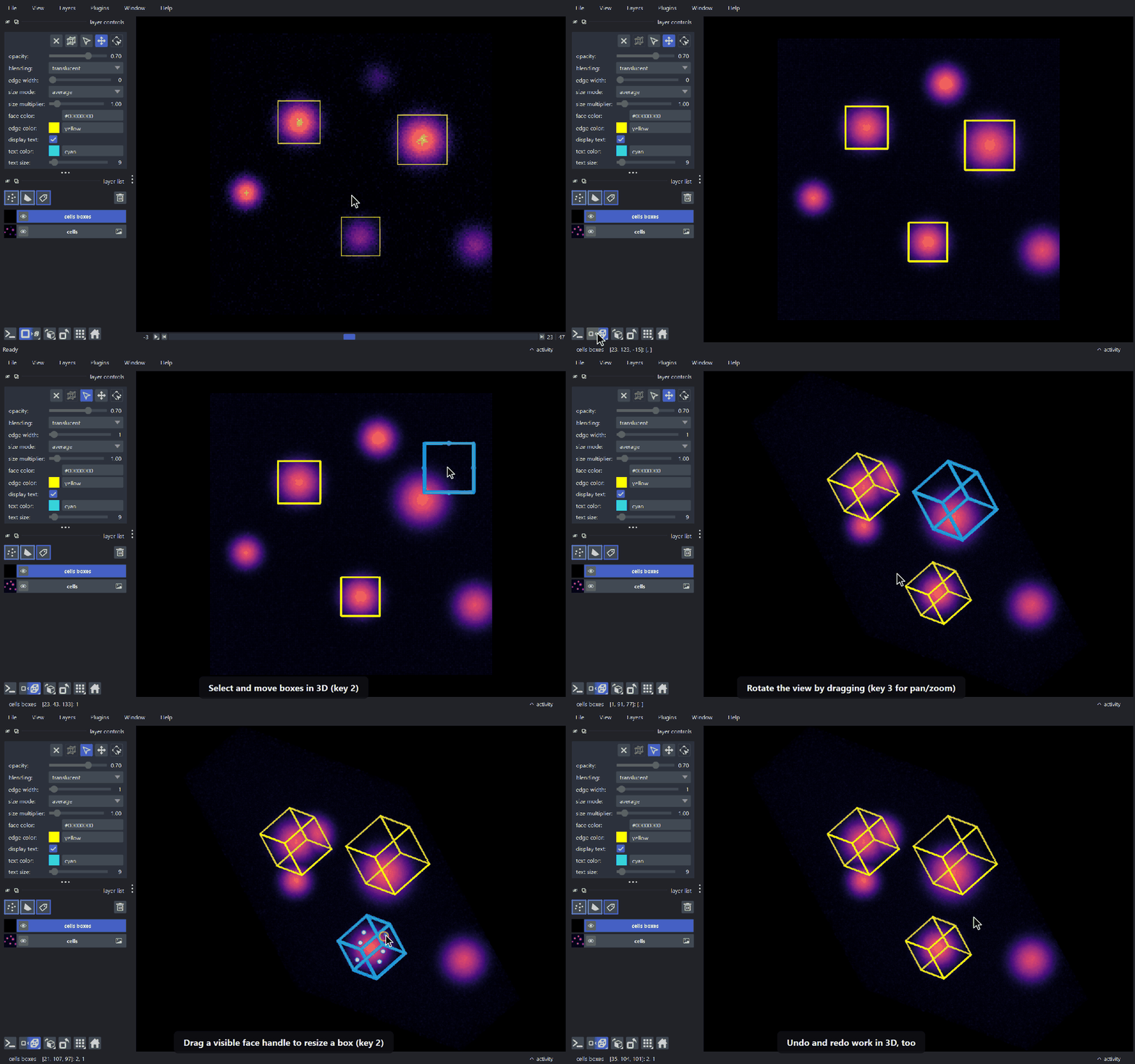\n\n\nThis [napari] plugin was generated with [Cookiecutter] using [@napari]'s [cookiecutter-napari-plugin] template.\n\n\n\n## Usage\n\nCreate a layer from code with `viewer.add_bounding_boxes`, or with the *Bounding\nBox Creator* widget from the `Plugins` menu:\n\n```python\nimport napari\nimport numpy as np\nimport napari_bbox # adds viewer.add_bounding_boxes\n\nviewer = napari.Viewer()\nviewer.add_image(np.random.rand(60, 200, 200))\n\n# every box is given by two opposite corners\nboxes = [\n np.array([[10, 20, 20], [40, 90, 100]]),\n np.array([[20, 100, 90], [55, 180, 170]]),\n]\nlayer = viewer.add_bounding_boxes(\n boxes,\n edge_color=\"yellow\",\n features={\"label\": [1, 2]},\n text=\"{label}\",\n)\n```\n\n`viewer.add_bounding_boxes(ndim=3)` creates an empty layer to draw boxes into, and\n`from napari_bbox import BoundingBoxLayer` gives direct access to the layer class.\n`layer.data` holds all `2 ** ndim` corners of every box.\n\n### Interacting with the boxes\n\nThe layer controls have one button per mode. A mode can also be activated with\nthe keyboard while the bounding box layer is active.\n\n| Mode | Key | What it does |\n| --- | --- | --- |\n| Select | 2 | Select, move and resize boxes. Hold Shift while resizing to keep the aspect ratio. |\n| Pan/zoom | 3 | Move the camera as usual. |\n| Add bounding boxes | 4 | Draw new boxes (2D views only). |\n\nHold Space to temporarily switch to pan/zoom in any mode (rotate and\npan in 3D), and release it to go back to the previous mode. Selected boxes are\ndeleted with the delete button of the layer controls or with the\nDelete key.\n\n### Editing in 3D\n\nExisting boxes can be edited while the viewer is in 3D mode (add mode is only\navailable in 2D). In select mode:\n\n- **Click** a box to select it. Shift-click or Ctrl-click\n adds the box to the selection or removes it from there.\n- **Drag** a selected box to move all selected boxes in the plane parallel to the\n screen.\n- **Drag a face handle** of a single selected box to move that face along its\n axis, which resizes the box. The handle stays under the cursor, also in oblique\n views. Handles facing the camera are hidden.\n- **Drag on empty space** to draw a selection box. Boxes whose center is inside\n it get selected.\n- Pressing Space during a drag hands the rest of the drag over to the\n camera, so the view can be rotated in the middle of an edit.\n\n### Undo and redo\n\nEdits of the bounding boxes in the active bounding box layer can be undone with\nCtrl+Z and redone with Ctrl+Shift+Z\n(or Ctrl+Y), in 2D and in 3D. Adding, moving, resizing,\ndeleting and pasting boxes are one undo step each, a mouse drag is one step.\nSelecting boxes is not.\n\nFrom code, use `layer.undo()`, `layer.redo()`, `layer.can_undo`, `layer.can_redo`\nand `layer.clear_history()`. Undo and redo restore the corners, features, colors,\nedge widths and z-indices of all the boxes and emit the same `layer.events.data`\nevents as the edit they are equal to. The last 50 edits are kept.\n\nSetting `layer.data` or `layer.features` from code is not an edit, it is not\nrecorded. If it changes the layer the history is cleared, so undo cannot bring\nback boxes from before the change. Adding boxes with `layer.add` and deleting\nthem with `layer.remove_selected` are edits.\n\n### Reading and saving\n\nBounding boxes are stored in CSV files with one box per row: the minimum\ncorner followed by the maximum corner, i.e. `min_0, ..., min_n, max_0, ..., max_n`\nfor boxes in `n` dimensions.\n\n- `napari-bbox` registers a reader for `.csv` files, so they can be opened with\n `File > Open`.\n- The *Bounding Box Creator* widget has buttons to create, open and save layers.\n- From code, `napari_bbox.write_single_bbox(path, layer.data, {})` saves a layer.\n\n## Installation\n\nYou can install `napari-bbox` via [pip]:\n\n pip install napari-bbox\n\n\n\nTo install latest development version :\n\n pip install git+https://github.com/bauerdavid/napari-bbox.git\n\n## Compatibility\n\n`napari-bbox` supports **Python 3.9 and newer** and **napari 0.4.15 and newer**.\n\n### Supported napari versions\n\n| napari | Python | Undo/redo and 3D editing | Tested in CI |\n| --- | --- | :---: | --- |\n| 0.4.15 – 0.4.17 | 3.9+ | no | 0.4.15, 0.4.17 |\n| 0.4.18 – 0.4.19 | 3.9+ | yes | 0.4.18, 0.4.19 |\n| 0.5.x | 3.9+ | yes | 0.5.0, 0.5.6 |\n| 0.6.x – 0.7.x | 3.10+ | yes | 0.6.0, 0.6.6, 0.7.1 |\n| 0.8.x – 0.10.x | 3.11+ | yes | 0.10.0 |\n\nThe Python versions are the ones napari itself requires. napari 0.10 also\nrequires Qt6.\n\n### Testing\n\n- The test suite runs in CI on every push and pull request, against the napari\n versions in the last column. `napari-bbox` has a separate implementation for\n each range of napari versions, and these are the oldest and newest releases\n of each of them.\n- The tests run on Linux. Windows and macOS are not covered by CI.\n- Other releases within the ranges above, such as 0.4.16, 0.5.3 or 0.9.2, are\n not tested separately.\n\n## Changelog\n\n### 0.2.0\n\n**Added**\n\n- [Editing of existing bounding boxes in 3D views](#editing-in-3d): select, move\n and resize boxes with face handles, and box selection.\n- [Undo and redo](#undo-and-redo) of box edits.\n- Support for napari 0.10.\n- A CI test suite that runs against napari 0.4.15 up to 0.10.\n\n**Changed**\n\n- In a layer with a scale, the thickness of the edges (`edge_width`) and the size\n of new boxes along the dimensions that are not displayed (average mode and the\n size constant) are in world units, so they do not depend on the scale.\n Layers without a scale are not affected.\n\n**Fixed**\n\n- *Duplicate Layer* raised an error on napari 0.5 and newer.\n- Removing the last bounding box left it displayed.\n- Clearing a layer raised an error on napari 0.4.15 with vispy 0.12 or newer.\n- The opacity and blending rows of the layer controls were shown twice on napari\n 0.6 and newer, and a new layer had an opacity of 0 on napari 0.6.0.\n- Boxes drawn in a layer with a scale were stretched along the scaled axes in the\n dimensions that are not displayed.\n- The edges of the boxes were stretched along the scaled axes in layers with a\n scale, e.g. the 3D tubes became flat ribbons.\n\n## Contributing\n\nContributions are very welcome. Tests can be run with [tox] or with `pytest`,\nplease ensure the coverage at least stays the same before you submit a pull request.\n\nThe demo GIFs of this page are generated with\n[napari-demo-recorder](https://github.com/bauerdavid/napari-demo-recorder) from the\nfiles in [`docs/demos`](https://github.com/bauerdavid/napari-bbox/tree/main/docs/demos). After changing the user interface, render them again with\n\n pip install git+https://github.com/bauerdavid/napari-demo-recorder.git\n napari-demo-recorder render docs/demos/*.demo.yaml\n\n## License\n\nDistributed under the terms of the [BSD-3] license,\n\"napari-bbox\" is free and open source software\n\n## Issues\n\nIf you encounter any problems, please [file an issue] along with a detailed description.\n\n\n[napari]: https://github.com/napari/napari\n[Cookiecutter]: https://github.com/audreyr/cookiecutter\n[@napari]: https://github.com/napari\n[MIT]: http://opensource.org/licenses/MIT\n[BSD-3]: http://opensource.org/licenses/BSD-3-Clause\n[GNU GPL v3.0]: http://www.gnu.org/licenses/gpl-3.0.txt\n[GNU LGPL v3.0]: http://www.gnu.org/licenses/lgpl-3.0.txt\n[Apache Software License 2.0]: http://www.apache.org/licenses/LICENSE-2.0\n[Mozilla Public License 2.0]: https://www.mozilla.org/media/MPL/2.0/index.txt\n[cookiecutter-napari-plugin]: https://github.com/napari/cookiecutter-napari-plugin\n\n[file an issue]: https://github.com/bauerdavid/napari-bbox/issues\n\n[napari]: https://github.com/napari/napari\n[tox]: https://tox.readthedocs.io/en/latest/\n[pip]: https://pypi.org/project/pip/\n[PyPI]: https://pypi.org/\n",
"description_content_type": "text/markdown",
"keywords": null,
"home_page": "https://github.com/bauerdavid/napari-bbox",
"download_url": null,
"author": "David Bauer",
"author_email": "david.bauer@brc.hu",
"maintainer": null,
"maintainer_email": null,
"license": "BSD-3-Clause",
"classifier": [
"Development Status :: 2 - Pre-Alpha",
"Framework :: napari",
"Intended Audience :: Developers",
"License :: OSI Approved :: BSD License",
"Operating System :: OS Independent",
"Programming Language :: Python",
"Programming Language :: Python :: 3",
"Programming Language :: Python :: 3 :: Only",
"Programming Language :: Python :: 3.9",
"Programming Language :: Python :: 3.10",
"Programming Language :: Python :: 3.11",
"Programming Language :: Python :: 3.12",
"Programming Language :: Python :: 3.13",
"Topic :: Scientific/Engineering :: Image Processing"
],
"requires_dist": [
"numpy",
"qtpy",
"napari>=0.4.15",
"packaging",
"pandas",
"npe2",
"vispy",
"superqt>=0.6.7",
"tox; extra == \"testing\"",
"pytest; extra == \"testing\"",
"pytest-cov; extra == \"testing\"",
"pytest-qt; extra == \"testing\"",
"napari; extra == \"testing\"",
"pyqt5; python_version < \"3.11\" and extra == \"testing\"",
"pyqt6; python_version >= \"3.11\" and extra == \"testing\""
],
"requires_python": ">=3.9",
"requires_external": null,
"project_url": [
"Bug Tracker, https://github.com/bauerdavid/napari-bbox/issues",
"Documentation, https://github.com/bauerdavid/napari-bbox#README.md",
"Source Code, https://github.com/bauerdavid/napari-bbox",
"User Support, https://github.com/bauerdavid/napari-bbox/issues"
],
"provides_extra": [
"testing"
],
"provides_dist": null,
"obsoletes_dist": null
},
"npe1_shim": false
}